Nuevo
Document Parser OCR
Automatically convert PDFs, images and scanned documents into searchable, actionable text
About this app
Stop manually copying data from documents attached to your Zendesk tickets. Swifteq Document Parser OCR automatically extracts text from PDFs, images, and scanned documents — then inserts it as a comment or updates ticket fields with specific data like invoice numbers, customer addresses, and order IDs.
No more squinting at scanned forms or manually typing out data. Your team get instant access to the information they need, right inside the ticket.
Features That Make Document Parser OCR a Must-Have
✅ Automatic OCR Text Extraction
Automatically convert attached PDFs, images (JPG, PNG, HEIC), and scanned documents into searchable, readable text — as soon as a ticket is created or updated.
✅ Insert Extracted Text as Ticket Comments
The full extracted text is added as an internal note on the ticket, giving agents instant access to document content without opening attachments.
✅ Smart Field Autofill
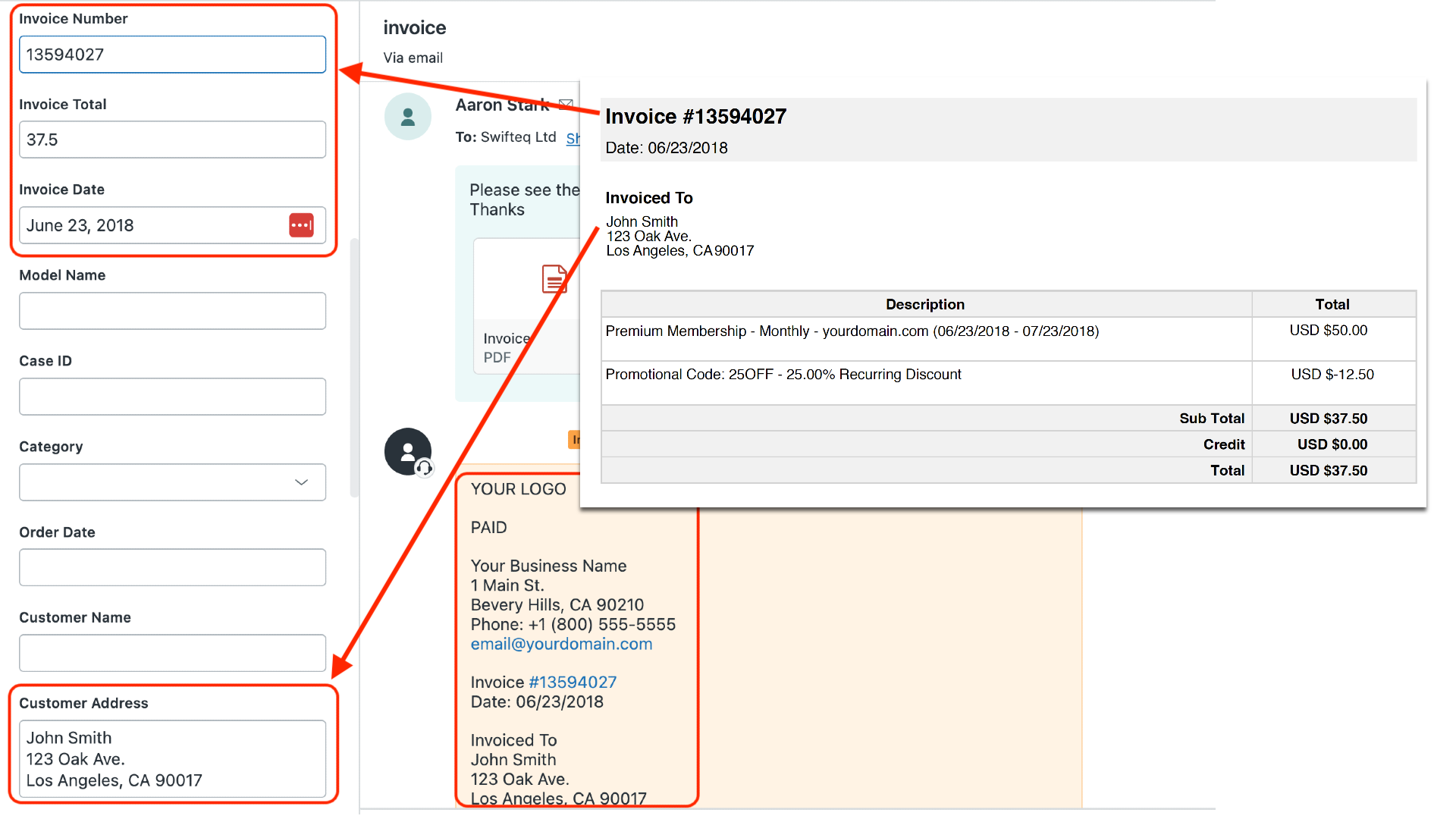
Go beyond simple text extraction. Define rules to automatically identify and extract specific data — invoice numbers, customer IDs, addresses, dates, and more — and populate custom fields automatically.
✅ AI-Powered Data Recognition
Use AI to intelligently recognize and extract structured data from complex documents like invoices, medical forms, shipping labels, and contracts.
✅ All-in-One Solution — OCR + Extraction in a Single App
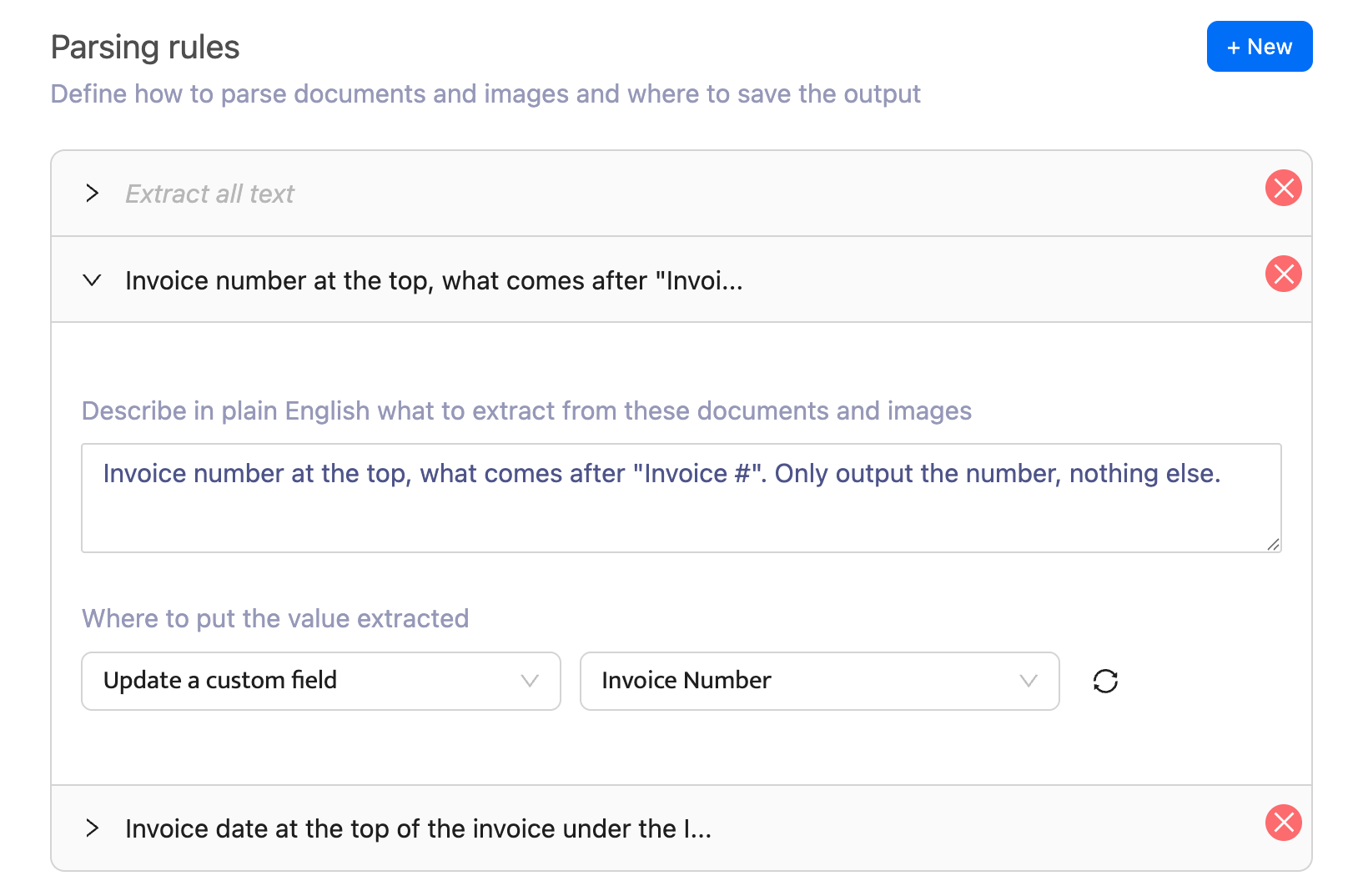
Unlike competitors that require separate apps for OCR and data extraction, Document Parser OCR handles everything in one place. AI reads your documents and extracts the specific data you need — no regex, no rigid pattern matching, no juggling multiple apps.
✅ Flexible AI Extraction Rules
Describe what data to extract in plain language and let AI do the rest.
✅ Zendesk Trigger Integration
Works seamlessly with Zendesk triggers to process documents when tickets are created or updated.
✅ Real-Time Processing
Documents are processed automatically as tickets arrive.
Click Install now to start your free 14-day trial. No credit card required.
Learn more about our Document Parser OCR App.
Why Choose Swifteq's Document Parser OCR?
🎯 Eliminate Manual Data Entry
Stop wasting time copying information from attachments into ticket fields. Let OCR and AI do it instantly.
⏱️ Faster First Response Times
With document data extracted and fields populated before agents open the ticket, your team can respond faster and resolve issues sooner.
🔍 Make Attachments Searchable
Turn static PDFs and images into searchable text.
🛠️ Easy No-Code Setup
Configure extraction rules with a simple interface — no technical skills required. Go live in minutes.
💰 Transparent Pricing
Pricing starts at €99/month. Visit our pricing page for details.

About the Developer:
Document Parser OCR is developed by Swifteq, a qualified Zendesk technology partner. Our suite of Automation, Help Center, and Agent-Assist Zendesk apps help Support Teams work smarter while keeping the customer experience at the center of everything they do.
Data Privacy: Document Parser OCR processes document data only when triggered and does not store customer data. For more details, visit swifteq.com/data-zendesk-apps
Detalles de la aplicación
Cómo instalar
Get started in few easy steps. Check out our help center for more guidance.
Click the Install button to install the application in Zendesk, then open the app from the navigation menu
Create a new Swifteq account, from the app or by signing up at swifteq.com/zendesk-document-parser-ocr
Authorize the app to access your Zendesk account via the API: learn how
Create and configure your workflows to categorize into intents and topics.
Enable the auto-classification on your Zendesk account, and watch your support process transform.
Déjanos una reseña
Comparte tu experiencia con el resto de la comunidad Zendesk