MCP Server
Connect Zendesk to any MCP compatible AI assistant.
Funciona con
Support
Desarrollador
SwifteqAbout this app
MCP Server for Zendesk by Swifteq is a powerful, user friendly solution that brings the full potential of AI directly into your Zendesk Support workflows.
This app acts as a secure bridge between Zendesk and any MCP compatible AI assistant, letting you unlock smarter ticket analysis, AI powered suggestions, and insightful reporting without juggling extra tools.
Start free: 500 MCP calls a month, shared across your whole Zendesk account. Above that it is 49 EUR a month per account with unlimited calls and one user included, plus 9 EUR a month for each extra user. Pricing takes effect on 1 October 2026.
👉 Sign Up Here to Start Using MCP Server for Zendesk Today
Whether you're boosting agent productivity, improving response quality, or driving data driven decisions, MCP Server for Zendesk is your one stop path to a more intelligent support operation.
Features: What Makes MCP Server for Zendesk a Must Have?
✅ Connect Zendesk to Any MCP Enabled AI
Seamlessly link your Zendesk account to tools like Claude Desktop, Cursor, and other MCP compatible assistants through a secure, standards based interface.
✅ Insightful Ticket Analysis
Ask natural language questions like "What issues increased this week?" or "Which topics cause the most friction?" and receive instant, data backed insights.
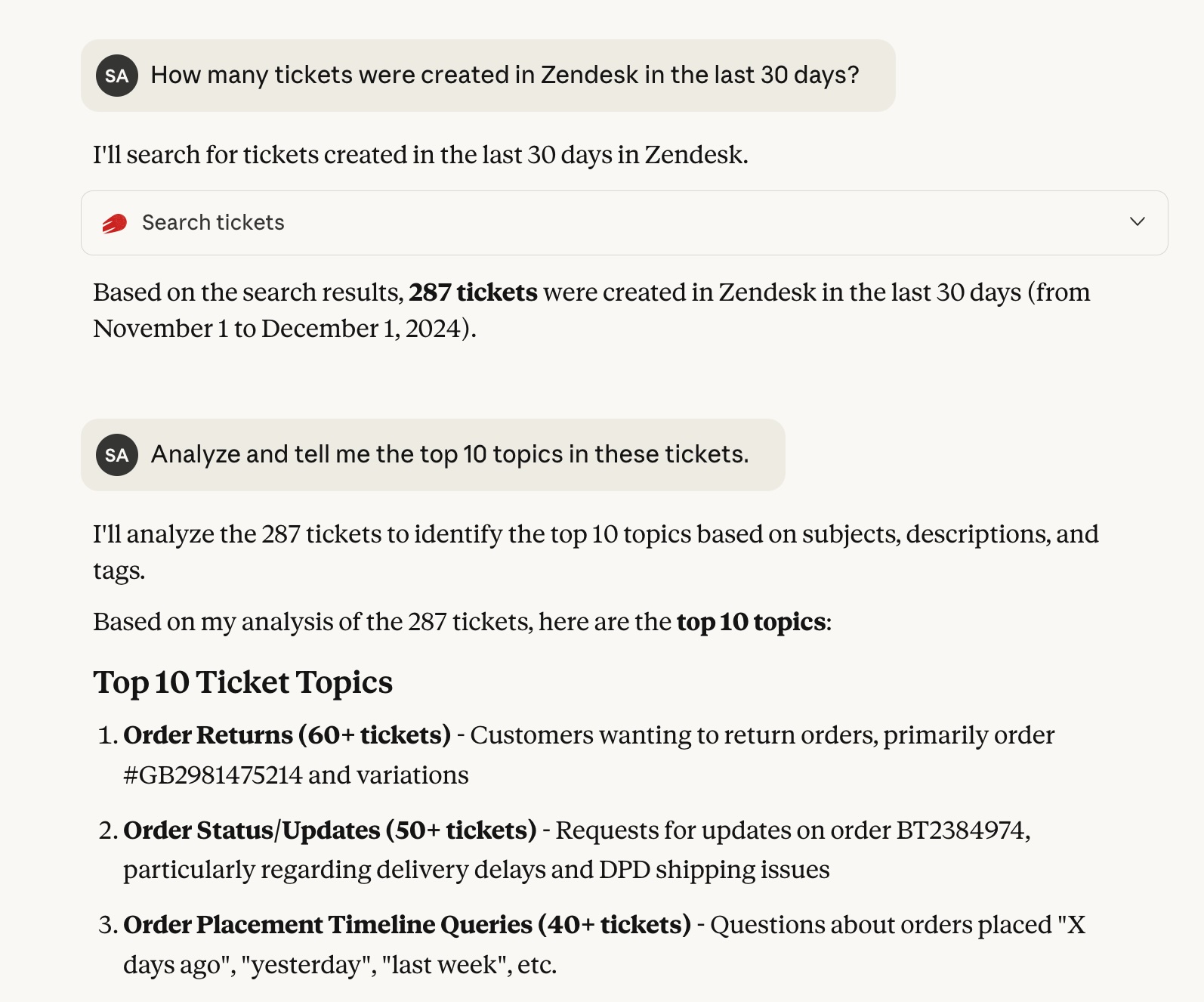
✅ Smart Tagging and Classification
Use AI to analyze ticket content and suggest meaningful tags or categories that improve routing and reporting.
✅ Flexible and Vendor Neutral Architecture
Choose the AI tools you prefer: Claude, ChatGPT, Cursor or any other MCP compatible assistant. You are not locked into one vendor's AI, and you keep full control over your data and workflows.
Benefits: Why Choose MCP Server for Zendesk?
⏱️ Time Saving Efficiency
Automate summaries, tagging, data extraction, and reviews so agents stay focused on solving customer issues.
📊 Improved Operational Visibility
Turn raw ticket activity into easy to understand insights that help you identify trends and optimize processes.
👥 Empower Your Support Team
Let agents ask natural language questions about tickets or customer patterns and get instant, helpful answers.
🔒 Secure API Based Access
Your Zendesk data is accessed through secure, permission controlled API calls with no unnecessary data exposure.
📦 Scale QA Without Extra Overhead
AI can scan large batches of tickets to surface anomalies, sentiment concerns, or quality issues automatically.
🎨 Improve Documentation and Self Service
Identify missing help articles, content gaps, or repeated customer questions that point to areas needing better guidance.
🚀 Share Zendesk Insights Beyond the Support Team
Provide secure, controlled access to Zendesk ticket data for colleagues who don’t have a Zendesk account. Product, engineering, UX, marketing, and leadership teams can use MCP supported AI tools to explore customer feedback, spot patterns, and make more informed decisions without needing full Zendesk access.
💰 Free Tier, Simple Pricing
Start with 500 MCP calls a month at no cost. Above that it is 49 EUR a month per account with unlimited calls, plus 9 EUR per extra user: you pay for the people using it, not for how much they use it. Full details at swifteq.com/zendesk-mcp-server#pricing
About the Developer:
MCP Server for Zendesk is developed by Swifteq, a qualified Zendesk technology partner. Our suite of Automation, Help Center, and Agent Assist apps helps support teams work smarter while keeping customer experience at the center of everything we build.
Data Privacy: MCP Server for Zendesk fetches ticket data only when requested and never stores or retains it. For more details, visit swifteq.com/data-zendesk-apps
Detalles de la aplicación
Cómo instalar
Get started in few easy steps
Create your free account: https://agenthelper.swifteq.com/auth/mcpserver
Connect the MCP Server to your Zendesk Support account
Configure your preferred MCP client
Start using AI to improve your Zendesk workflows
Déjanos una reseña
Comparte tu experiencia con el resto de la comunidad Zendesk