Nuevo
Skip.ly
Turn Zendesk's skip log into a live, filterable analytics dashboard.
Funciona con
Support
Desarrollador
vaide.app
About this app

Skipped tickets are invisible until they become a problem.
Every time an agent skips a ticket in Zendesk, that decision disappears into the log — no context, no pattern, no accountability. Recurring skip reasons go unnoticed, some agents skip far more than others, and admins only find out once a ticket has bounced around for hours.
Skip.ly turns that raw skip log into a live analytics dashboard, right inside Zendesk Support. No exports, no manual digging — just the numbers, as they happen.
The problem with untracked skips
Tickets get passed over repeatedly with no one noticing the pattern
Some agents skip far more than others, with no easy way to see who
Skip reasons pile up with no way to spot the recurring ones
Admins only investigate after a customer complains about a delay
No single place to see skip volume across groups, brands, or forms
How Skip.ly solves it
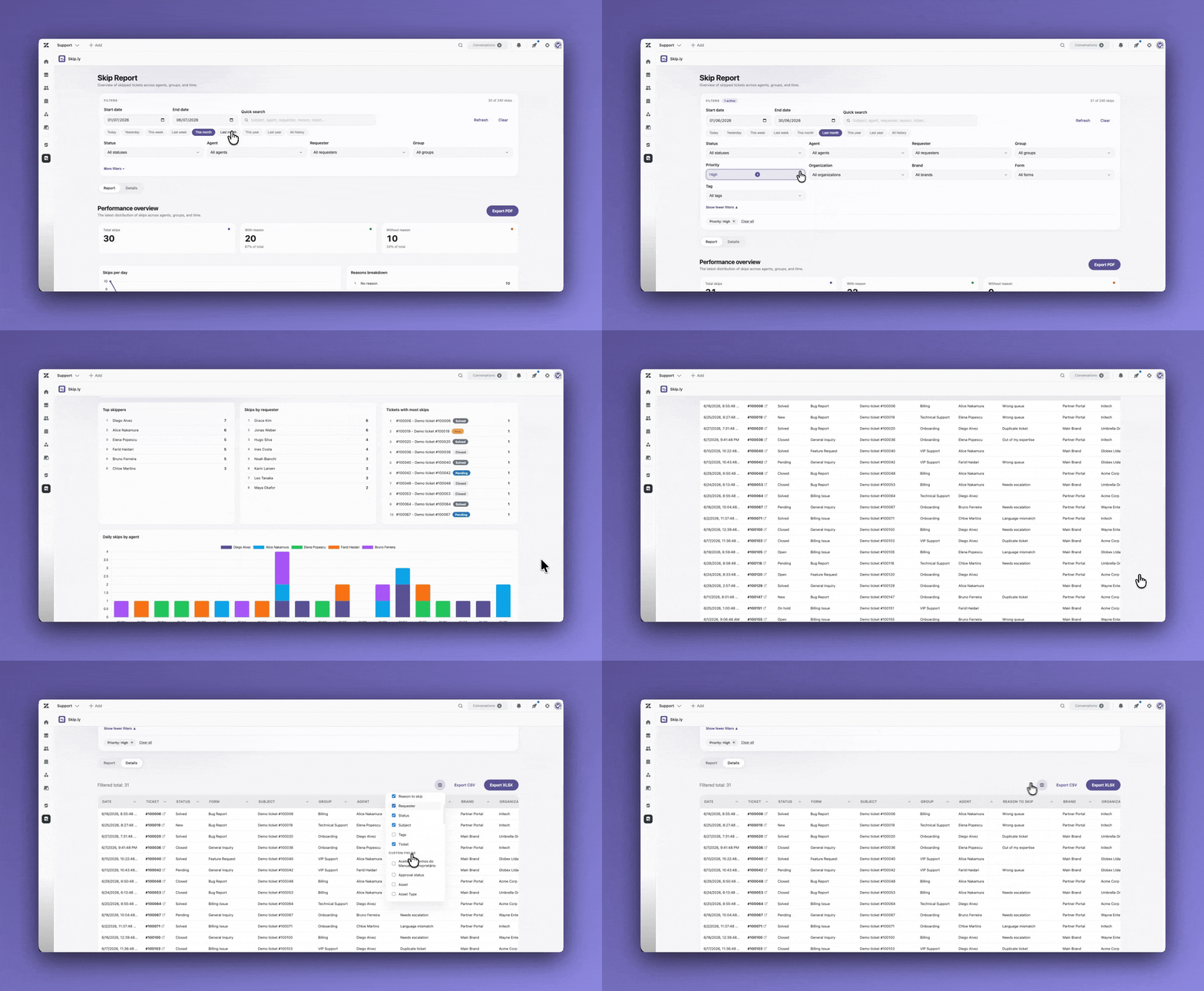
Skip.ly reads directly from Zendesk's skip data and turns it into a filterable report, updated in real time. You get visibility into:
- Skip volume over time — daily, weekly, and cumulative trends
- Top agents — who is skipping the most tickets
- Skip reasons — which come up most, and how many skips have none at all
- Top tickets — which individual tickets get skipped repeatedly
- Groups, brands, and forms — where skips are concentrated
- Requesters and organizations — which customers are most affected
Everything is filterable by date range, agent, requester, organization, group, brand, form, tag, status, and priority — with live search across the filtered results.
What your team gains
Faster root-cause analysis — see at a glance which agents, groups, or forms generate the most skips.
Fewer repeat skips — spot tickets that keep getting passed over before they become an SLA problem.
Clear accountability — skip activity by agent is visible instead of buried in raw event logs.
Better staffing decisions — skip patterns by group and brand highlight where routing needs adjusting.
No extra tooling — runs inside Zendesk Support, no separate BI tool or manual data pulls required.
Key features
- Report view — charts for skip volume over time, top agents, skip reasons, top tickets, and breakdowns by group, brand, form, organization, and requester
- Detail view — full sortable table of every skip in the filtered range
- Export — download the filtered results as CSV or XLSX
- Rich filtering — date range, agent, requester, organization, group, brand, form, tag, status, priority, and free-text search
- Light and dark theme — matches your Zendesk color scheme automatically
- Local caching — repeat views load instantly without re-fetching from Zendesk
- Multi-language interface — matches each agent's Zendesk locale, with 28+ languages including English, Portuguese, Spanish, French, German, Japanese, and Chinese
Data handling
Skip.ly reads skip, ticket, and reference data directly from the Zendesk API inside the Zendesk client. Data is cached locally in the browser to speed up repeat views. No ticket content, customer data, or agent activity is sent to external servers.
Built by vaide.app
Skip.ly is developed by vaide.app, a team specializing in Zendesk customization and support operations tooling.
Questions or want a setup walkthrough? Reach us at support@vaide.app.
Detalles de la aplicación
Cómo instalar
- Search for Skip.ly in the Zendesk Marketplace and click Install — no settings required at this step
- In Zendesk Admin Center, go to Apps and Integrations > Zendesk Support Apps to confirm the installation
- Click the Skip.ly icon in the Zendesk navigation bar to open the dashboard
- Filter by date range, agent, requester, organization, group, brand, form, tag, status, or priority; switch between the Report and Detail tabs to explore skip volume, reasons, and trends, and export as PDF (Report) or CSV/XLSX (Detail)
Requires admin access. Questions? support@vaide.app
Déjanos una reseña
Comparte tu experiencia con el resto de la comunidad Zendesk